Overview
Buddi automatically syncs supported discounts created in Cova Promotions Hub, allowing you to manage your promotions in Cova without recreating them in Buddi.
This article explains which Cova promotion types Buddi supports, how promotions are prioritized and scheduled, and important considerations when using product Classifications.
For step-by-step instructions on creating discounts in Cova, see Setting up Discounts in Cova (to Sync into Buddi).
How it works
When you create, update, or remove a supported promotion in Cova Promotions Hub, the change will automatically sync to your Buddi menu.
Promotions may not appear immediately because menu data syncs on a timed interval. To speed up the process, you can use Sync New Products under My Menu in the Buddi Admin Portal, then refresh your menu to verify the promotion.
Supported Promotion Types
Buddi supports the following Cova promotion types:
- Dollar Amount Off ($ Off): e.g., $5 off a specific product or category
- Percentage Off (% Off): e.g., 10% off all edibles
NOTE: At this time, Bundling (e.g., buy product A + product B for a special price) and BOGO (Buy One, Get One) promotions created in Cova promotions are not supported and will not appear in Buddi.
Important Considerations
- Date & Time Restrictions: Buddi fully respects the start and end dates/times set for promotions in Cova.
- Time Zone Conversion: Buddi automatically converts the promotion times from UTC (as provided by Cova) to the retailer's local time zone. This ensures promotions start and end accurately according to the store's operating hours.
- Day of Week Restrictions: If a promotion in Cova is configured to run only on specific days (e.g., "Weekend Sale" active only Saturday & Sunday), Buddi will enforce this and only show the promotion on those designated days.
- Promotions Prioritized by Date: If a product is part of two different promotions, the most recently updated promotion will take precedence.
- Product Sale Prices Take Priority: Individual products where a sale price was applied through the catalog take priority over promotional pricing.
- Large or Complex Classification Structures: If your Cova Product Tree contains a large number of categories or multiple nested sub-categories (aka 'Classifications'), they may need to be mapped in our system. This ensures promotions will capture all applicable products. Please send a category mapping request to support@buddi.io.
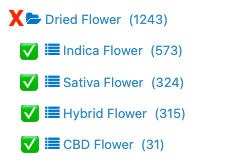
- Selecting Classifications in Cova: When creating a promotion using Classification as the 'Criteria', select the most specific sub-categories relevant to the promotion rather than only the broad parent category (aka a folder with a specific group of Classifications).
- In some setups, choosing only a parent category may exclude certain sub-categories from receiving the discount.
- e.g. If the criteria is to include all flower products, you would select all specific Classifications in the broad category, not the folder itself:
- If you encounter issues with having some products show applicable discounts, please reach out to our support team for further assistance. It may have to do with how Classifications are syncing into Buddi.
Was this article helpful?
That’s Great!
Thank you for your feedback
Sorry! We couldn't be helpful
Thank you for your feedback
Feedback sent
We appreciate your effort and will try to fix the article